Jan 4, 2013

Converting CGFloat to int [Objective-C]

Posted Jan 4, 2013
There are cases that you want to convert float numbers to integer. One example is when you're using a frame's attribute, say, frame.size.width and you want to know if it's odd or even number. Before you can do a modulo operation, the numbers must be in integer format.

The easiest way is to round the float value first and typecast it to int.
E.g.


int integerWidth = (int) roundf(myFrame.size.width);

Hope this helps!

Dec 3, 2012

[Solved] JQuery File Upload is Not Working with Express 3

Posted Dec 3, 2012
I tried to incorporate the Node js implementation of JQuery File Upload with Express 3. It uses Formidable middleware for parsing multi-part data which is not compatible with Express 3's body parser. Fortunately, there's a quick fix:

//just replace express.bodyParser() with:
app.use(express.json());
app.use(express.urlencoded());

From Myk's explanation in StackOverflow, Express uses express.bodyParser() as a convenience method to wrap 3 parsers (express.json, express.urlencoded and express.multipart) into one.

Alternative Solution:

Another approach is to redefine the multipart parser of Express (co elmigranto):

var express = require('express');
var bodyParser = express.bodyParser;

bodyParser.parse('multipart/form-data') = function(req, options, next) {
 //custom parser or:
  next();
}

//don't forget to use the variable bodyParser in your configuration


Dec 1, 2012

Cute and Geeky Anniversary Gift

Posted Dec 1, 2012
My friend bought a domain for his interior-designer girlfriend on their second anniversary. Awwwww, cute.. and geeky :) Don't you love how technology brings us closer?

Even comes with a lovely poem . You may check the site at www.veravillarosa.com


Nov 29, 2012

How to Hide the Share Buttons of Blogger

Posted Nov 29, 2012
If you are using third-party sharing buttons such as Add This, you'll notice that the default share button of Blogger is left behind:


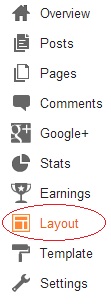
Fortunately, removing this is very easy. You just need to find where the setting is:
  1. Go to Layout Setting of Blogger


  2. Click the Edit link


  3. Untick Show Share Buttons option in the pop-up setting

Congratulations, your default share buttons are now hidden from view. 

Nov 27, 2012

SVN Revert a file to a Previous Version

Posted Nov 27, 2012
svn merge -c -[revision number] [file]

e.g.
svn merge -c -80 Classes/MyClass.m
80 is the revision number

Or if you want your entire revert your workspace:
svn merge -c -80 .


Nov 25, 2012

Node JS - Listen to External IP Address

Posted Nov 25, 2012
I wanted to try my local server in an iPad device and when I accessed its external port (192.168.0.24) in our intranet, it's not working. At first I changed the listen address from 127.0.0.1 to 192.168.0.24 and it worked, the problem was I cannot access http://localhost:3000 after. In addition, this approach of hardcoding the address is not an acceptable solution in the long run; there must be another way.

How to make your node js server listen to external ip

The fix is easy but not very intuitive. Just change the listen address from 127.0.0.1 to 0.0.0.0

I encountered a minor hiccup: I stored the address in a global variable and used it in a special function that accessed my own server. So my function was trying to access http://0.0.0.0:3000/... and it wouldn't work this way. So I just retained the 127.0.0.1 for my special functions.

I wonder why node js decided to implement it this way (or I'm not sure if it's Express js that's the culprit here). Why not just listen to all available IP Addresses when you specify 127.0.0.1? Maybe it's a security issue; I don't know.

[Update 18-Feb-2013] As "Reality Check" pointed out, NodeJS can listen to any IP address if you don't specify the host parameter. It's right here in NodeJs API:


server.listen(port, [hostname], [backlog], [callback])
Begin accepting connections on the specified port and hostname. If the hostname is omitted, the server will accept connections directed to any IPv4 address (INADDR_ANY).

Nov 15, 2012

Change the Back button Title in iOS UINavigation

Posted Nov 15, 2012

I thought it was straightforward to alter the title of the back bar button item. Turns out you need to define the entire back bar button item in the calling screen.

In the calling controller (meaning, the parent controller where you will push the new controller), add this in viewdidload:


self.navigationItem.backBarButtonItem =  [[[UIBarButtonItem alloc] initWithTitle:@"Custom Back Title"
                                    style:UIBarButtonItemStyleBordered
                                   target:nil
                                   action:nil] autorelease];


My mistake was I keep changing the backBarButtonItem of the new controller! Sheesh, Apple.